How to Make Images Into Stickers on iPhone (iOS 17+ Guide)
Use iOS 17+ built-in background lift to turn photos into stickers, add die-cut effects, and use them in Messages without any subscription app.

Your iPhone already does most of this
Making stickers from your photos used to mean a third-party app, a subscription, and a weird watermark. On iOS 17 and later, you can long-press a subject in Photos, lift it off the background, and save it as a sticker right there. The rest is just knowing where to tap.
Here's the actual flow, plus the two things that trip people up.
The built-in way
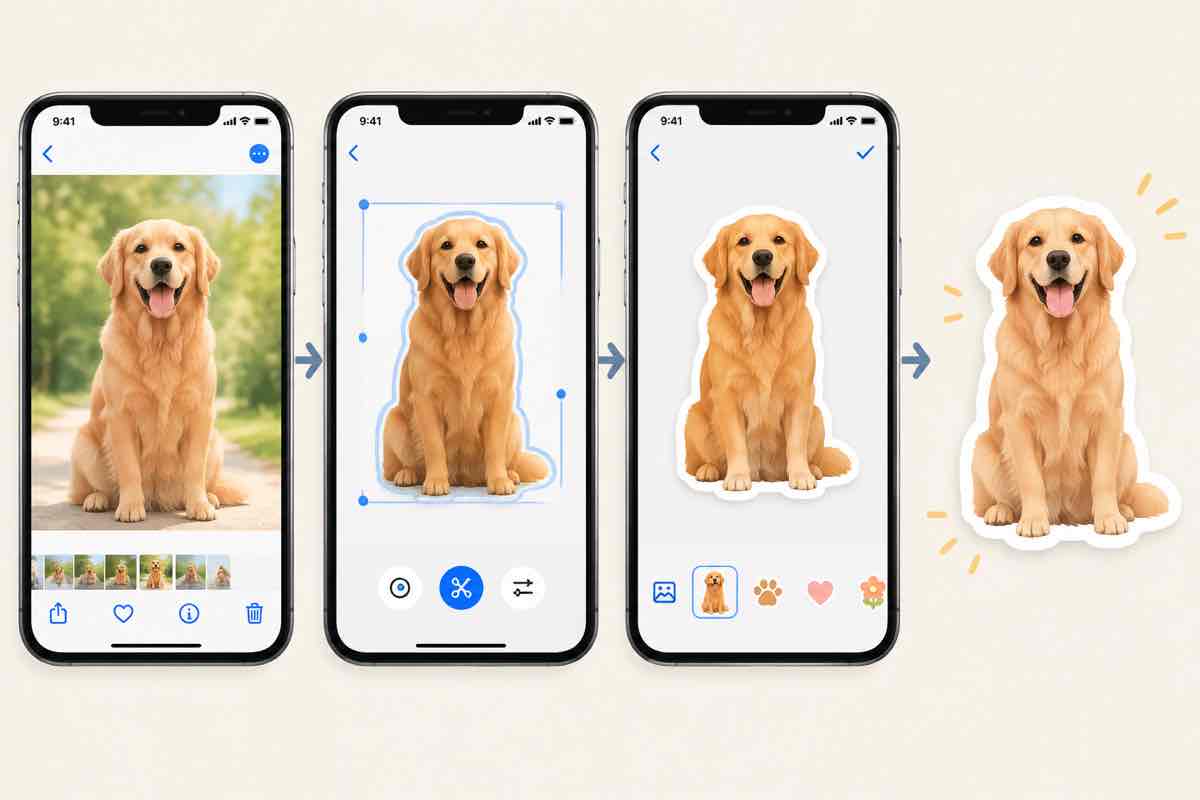
Open the photo in Photos, press and hold the main subject until a glowing outline appears, then drag. A menu pops up with Add Sticker. Tap it. Done—that sticker now lives in the stickers drawer, accessible in Messages, Notes, and any app that uses the iMessage sticker picker. It works on pets, people, cars, and pretty much anything with a clean enough edge.
Add a little flair
Long-press the sticker in the drawer and choose Add Effect to give it a white die-cut border, a comic outline, or a shadow. This is what makes it feel like a real sticker rather than a floating PNG. It's also where you can reorder or delete stickers you no longer use.
When you need more control
The built-in cutout is great, but it'll fumble on messy backgrounds—fur against grass, glass reflections, anything semi-transparent. For those, a dedicated sticker app or an online background-remover gives you a cleaner edge. You can still save the result to Photos and lift it from there, so the whole iOS workflow stays intact.
Where they show up
Once saved, your stickers appear in the iMessage app drawer. Swipe up in a chat, tap the plus, and you'll see them. They also work in the Messages camera effects and in Freeform. Drag them onto a chat bubble to send, or peel them off and restick them on other messages.
It's a tiny feature that's weirdly addictive. Once you lift your first cat off a photo, you'll start seeing sticker candidates everywhere you point the camera.